



























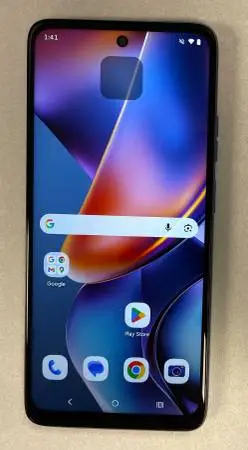
Motorola Moto G 2025 (128GB) - Like New, AT&T
Motorola Moto G 2025 (128GB) - Like New, AT&T Prepaid Locked! Price: $40 Important Note: This phone is locked to the AT&T Prepaid network and will only work with a AT&T Prepaid subscription. No AT&T Prepaid plan? No problem! This versatile phone can still be used as a fantastic mini-tablet, music player, or for Browse the internet on Wi-Fi at home or wherever you find a signal. Perfect for kids, a backup device, or just for entertainment! 🔥 Key Features & Tech Specs (Brief Summary): Display: Large 6.7-inch HD+ (1604x720) 120Hz LCD screen for smooth visuals. Camera: 50MP Quad Pixel main camera for sharp photos and a 16MP front camera for selfies. Performance: Powered by a MediaTek Dimensity 6300 processor with 4GB RAM for snappy everyday use. Battery: Long-lasting 5000mAh battery with 30W TurboPower™ charging capability. Storage: 64GB internal storage, expandable up to 1TB with a microSD card. Condition: Like new, no scratches or dents. Comes with USB cable. Serious inquiries only, please! Cash only. Local pickup in Auburn Hills. Below are some uses of a second phone - Just $45 takes you a long way. Wi-Fi only devices can be incredibly useful for a variety of purposes: 1. Dedicated Media Player/Entertainment Device: Music & Podcasts: Load it up with your entire music library or download podcasts for offline listening. Videos: Download movies and TV shows from streaming services (like Netflix or YouTube Premium) to watch on the go without eating into your main phones data plan. Gaming: Play offline games without interruptions from calls or notifications. 2. Wi-Fi Only Communication Hub: Messaging Apps: Use Wi-Fi based messaging apps like WhatsApp, Telegram, or Facebook Messenger to communicate with friends and family when connected to Wi-Fi. Video Calls: Make video calls via Wi-Fi using apps like Zoom, Google Meet, Telegram, Whatsapp. VoIP Calls: Use Voice over IP (VoIP) apps like Google Voice to make calls over Wi-Fi. 3. Home Hub/Smart Device Controller: Smart Home Control: Use it as a dedicated remote for your smart home devices (lights, thermostats, speakers, etc.) so your main phone isnt cluttered with these apps. Security Camera Monitor: If you have Wi-Fi connected security cameras, this phone can be a dedicated monitor. Digital Photo Frame: Set it up to display a revolving slideshow of your favorite photos. 4. Backup Device: Emergency Phone: In a pinch, if your main phone dies or gets lost, a Wi-Fi enabled phone can still be used to connect to public Wi-Fi for emergency communication, accessing important contacts, or looking up information. Travel Companion: Take it with you when traveling abroad to connect to Wi-Fi and avoid roaming charges on your primary phone. You can use it for maps (downloaded offline), translation apps, or local ride-sharing services. 5. Kids Device/Guest Device: Kid-Friendly Tablet: A great way to give kids a phone for games, educational apps, and media consumption without worrying about them making calls or accessing cellular data. Guest Phone: Keep it charged and available for guests to use if they need to access Wi-Fi. 6. Development/Testing Device: If youre a developer or just curious, you can use a second phone to test new apps, custom ROMs, or experiment with settings without risking your primary device. 7. More uses: Dedicated GPS: Download offline maps (like Google Maps or HereWe Go Maps) and use it solely for navigation in your car, saving your main phones battery. E-reader: Load up eBooks and use it as a dedicated e-reader. Workout Companion: Use it for music, fitness tracking apps, or workout routines without your main phone getting sweaty or jostled.

ডিচিট পরিচয় করিয়ে দিচ্ছে - চূড়ান্ত স্থানীয় মার্কেটপ্লেস!
বিক্রি করুন, ক্রয় করুন, ডিচিট - উইন-উইন মার্কেটপ্লেস।
ডিচিট একটি রোমাঞ্চকর অভিজ্ঞতা প্রদান করে: 30 সেকেন্ডে তালিকা প্রস্তুত করুন, প্রতিদিন নতুন আগমনগুলি অন্বেষণ করুন, এবং একটি নিরাপদ কমিউনিটিতে ক্রেতা এবং বিক্রেতাদের সাথে সংযুক্ত হন। আপনার সুনাম গড়ে তুলুন, গোপন রত্নগুলি খুঁজে বের করুন, এবং স্থানীয়ভাবে কেনাকাটা করা মিলিয়ন মিলিয়ন ব্যবহারকারীর সাথে যোগদান করুন!