
























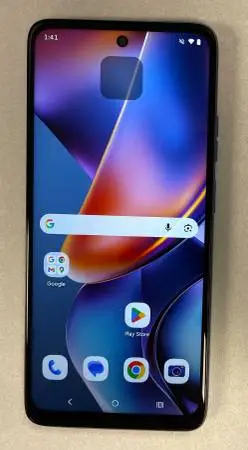
Motorola Moto G 2025 (128GB) - Like New, AT&T
Motorola Moto G 2025 (128GB) - Like New, AT&T Prepaid Locked! Price: $40 Important Note: This phone is locked to the AT&T Prepaid network and will only work with a AT&T Prepaid subscription. No AT&T Prepaid plan? No problem! This versatile phone can still be used as a fantastic mini-tablet, music player, or for Browse the internet on Wi-Fi at home or wherever you find a signal. Perfect for kids, a backup device, or just for entertainment! 🔥 Key Features & Tech Specs (Brief Summary): Display: Large 6.7-inch HD+ (1604x720) 120Hz LCD screen for smooth visuals. Camera: 50MP Quad Pixel main camera for sharp photos and a 16MP front camera for selfies. Performance: Powered by a MediaTek Dimensity 6300 processor with 4GB RAM for snappy everyday use. Battery: Long-lasting 5000mAh battery with 30W TurboPower™ charging capability. Storage: 64GB internal storage, expandable up to 1TB with a microSD card. Condition: Like new, no scratches or dents. Comes with USB cable. Serious inquiries only, please! Cash only. Local pickup in Auburn Hills. Below are some uses of a second phone - Just $45 takes you a long way. Wi-Fi only devices can be incredibly useful for a variety of purposes: 1. Dedicated Media Player/Entertainment Device: Music & Podcasts: Load it up with your entire music library or download podcasts for offline listening. Videos: Download movies and TV shows from streaming services (like Netflix or YouTube Premium) to watch on the go without eating into your main phones data plan. Gaming: Play offline games without interruptions from calls or notifications. 2. Wi-Fi Only Communication Hub: Messaging Apps: Use Wi-Fi based messaging apps like WhatsApp, Telegram, or Facebook Messenger to communicate with friends and family when connected to Wi-Fi. Video Calls: Make video calls via Wi-Fi using apps like Zoom, Google Meet, Telegram, Whatsapp. VoIP Calls: Use Voice over IP (VoIP) apps like Google Voice to make calls over Wi-Fi. 3. Home Hub/Smart Device Controller: Smart Home Control: Use it as a dedicated remote for your smart home devices (lights, thermostats, speakers, etc.) so your main phone isnt cluttered with these apps. Security Camera Monitor: If you have Wi-Fi connected security cameras, this phone can be a dedicated monitor. Digital Photo Frame: Set it up to display a revolving slideshow of your favorite photos. 4. Backup Device: Emergency Phone: In a pinch, if your main phone dies or gets lost, a Wi-Fi enabled phone can still be used to connect to public Wi-Fi for emergency communication, accessing important contacts, or looking up information. Travel Companion: Take it with you when traveling abroad to connect to Wi-Fi and avoid roaming charges on your primary phone. You can use it for maps (downloaded offline), translation apps, or local ride-sharing services. 5. Kids Device/Guest Device: Kid-Friendly Tablet: A great way to give kids a phone for games, educational apps, and media consumption without worrying about them making calls or accessing cellular data. Guest Phone: Keep it charged and available for guests to use if they need to access Wi-Fi. 6. Development/Testing Device: If youre a developer or just curious, you can use a second phone to test new apps, custom ROMs, or experiment with settings without risking your primary device. 7. More uses: Dedicated GPS: Download offline maps (like Google Maps or HereWe Go Maps) and use it solely for navigation in your car, saving your main phones battery. E-reader: Load up eBooks and use it as a dedicated e-reader. Workout Companion: Use it for music, fitness tracking apps, or workout routines without your main phone getting sweaty or jostled.

ขอแนะนำ Ditchit - ตลาดในท้องถิ่นที่ดีที่สุด!
ซื้อ ขาย ดิจิท - ตลาดแห่งความชนะทั้งสองฝ่าย
Ditchit มอบประสบการณ์เร้าใจ: ลงรายการใน 30 วินาที, สำรวจสินค้ามาใหม่ทุกวัน, และเชื่อมต่อกับผู้ซื้อและผู้ขายในชุมชนที่ปลอดภัย สร้างชื่อเสียงของคุณ ค้นพบของล้ำค่า และเข้าร่วมกับผู้ใช้หลายล้านคนที่ช้อปปิ้งในท้องถิ่น!