






























MagSafe Magnetic Sticker Adapter Ring for Cell Phone Case
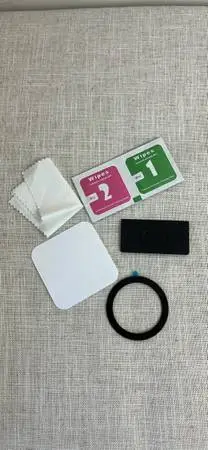
MagSafe Magnetic Sticker Adapter Ring for Cell Phone Case
MagSafe Magnetic Sticker Adapter Ring for Phone Case. Adapt a regular phone case to MagSafe compatibility. To install a MagSafe conversion sticker ring on your phone case, follow these steps: Clean the Surface: Thoroughly wipe the back of your phone case using the Wet Wipe (1) to dissolve oils, grease, and dirt. Follow up with the Dry Wipe (2) to completely dry the surface and remove streaks. Find the Center: Locate the internal wireless charging coil of your phone, which is typically situated directly in the center. Peel the Adhesive Backing: Carefully remove the protective release liner from the back of the blue magnetic ring. Position and Stick: Align the ring exactly with the center of the phone case. Gently drop it into place, making sure it clears any camera lens cutouts. Firmly Secure: Press down hard along the entire perimeter of the ring to secure the bond. For a silicone case, use the protective clear sticker before applying the ring on top. Use the black applicator card to smoothly slide over the clear sticker surface to push out trapped air pockets or tiny bubbles. Let it Cure: Avoid attaching any heavy magnetic accessories or mounts immediately. Allow the adhesive to cure undisturbed for at least 5 to 10 minutes to achieve maximum bonding strength.

Ipinapakilala ang Ditchit - Ang Pinakamahusay na Lokal na Pamilihan!
Bumili, Magbenta, Ditchit - Ang Win-Win na Pamilihan.
Nag-aalok ang Ditchit ng kapanapanabik na karanasan: maglistahan sa loob ng 30 segundo, tuklasin ang mga bagong dating araw-araw, at kumonekta sa mga mamimili at nagbebenta sa isang ligtas na komunidad. Itayo ang iyong reputasyon, hanapin ang mga nakatagong yaman, at sumali sa milyun-milyong gumagamit na namimili nang lokal!